
Before You Start
What you need before signing up
Apple Developer account ($99/year)
Required to access App Store Connect. If you don't have one, enroll at developer.apple.com.
At least one app created in App Store Connect
Go to App Store Connect > My Apps > click "+", fill in the basic info (name, bundle ID, SKU). You don't need to submit it yet — just create the app record.
First version set up (even if not submitted)
AppMetaHub reads metadata from your app versions. Make sure you have at least version 1.0 created with some locales enabled.
App Store Connect API key generated
We'll walk you through this in the next section.
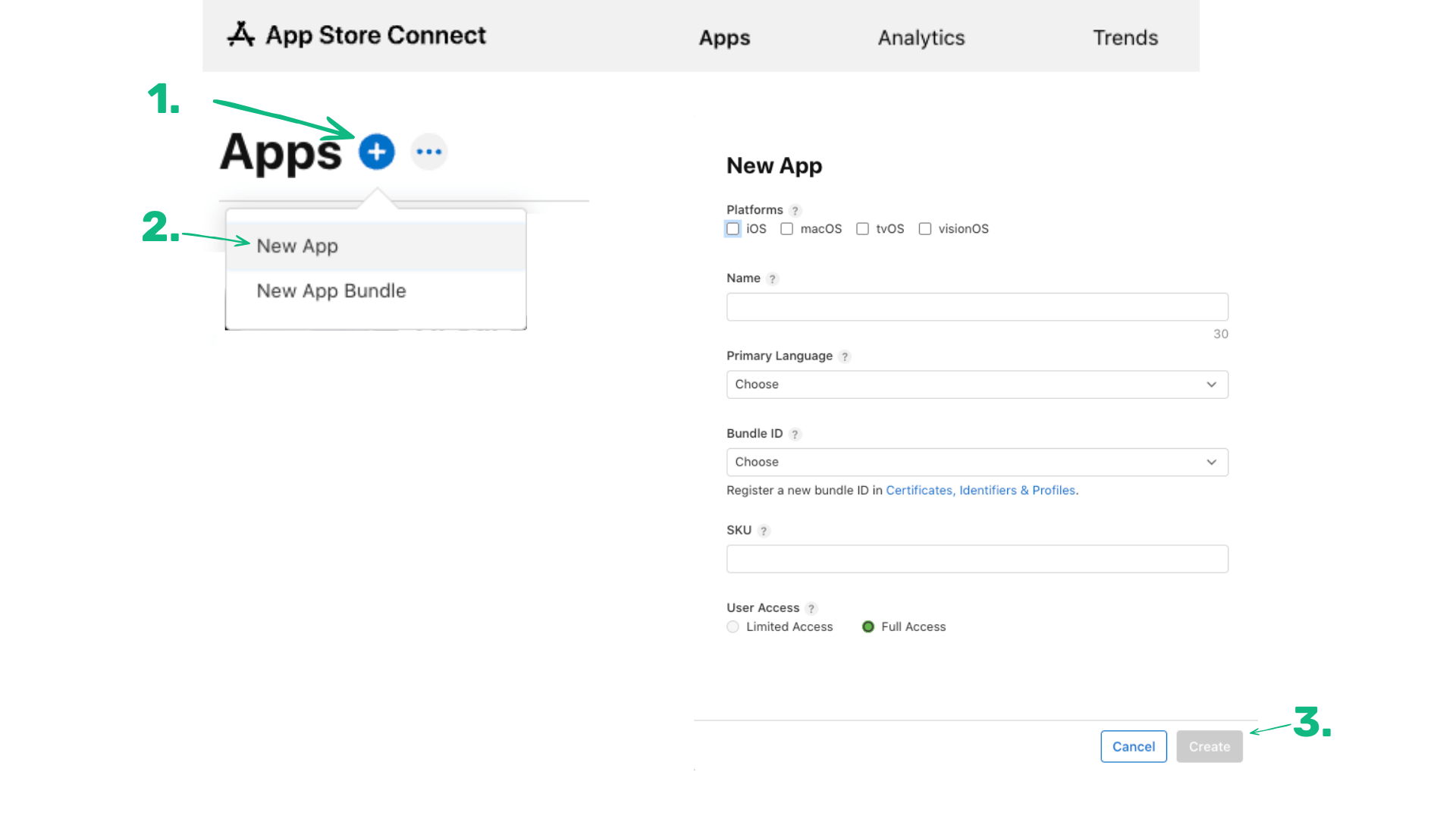
App Store Connect > My Apps > Create New App
Getting Started
AppMetaHub gets you from sign-up to editing metadata in under 2 minutes. Here's the setup flow:
Create your account
Go to appmetahub.com/signup and create a free account with your email. No credit card required.
Add your App Store Connect API key
Navigate to Settings > Credentials and add your ASC API key (Issuer ID, Key ID, and Private Key). See the next section for how to generate one.
Sync your apps
Click "Sync Apps" on the dashboard. AppMetaHub will automatically import all your apps with their metadata, localizations, and versions.
Start editing
Click any app to open the metadata editor. Edit titles, subtitles, descriptions, and keywords across all your locales. Save drafts or push directly to ASC.
Dashboard after first sync — all your apps imported
App Store Connect API Key
AppMetaHub uses Apple's official App Store Connect API. You need to generate an API key in your Apple Developer account and add it to AppMetaHub. This is safe — no passwords are shared, and you can revoke the key at any time.
How to generate your API key
Open App Store Connect
Go to App Store Connect > Users and Access > Integrations > App Store Connect API
Click "Generate API Key"
Give it a name like "AppMetaHub" and select the "App Manager" role. This role gives read and write access to app metadata, which is what AppMetaHub needs.
Download the .p8 private key file
Apple only lets you download this file ONCE. Save it somewhere safe. You will need the contents of this file.
Copy the Key ID and Issuer ID
Both are shown on the API keys page in App Store Connect. The Issuer ID is at the top of the page. The Key ID is in the table next to your key name.
Add to AppMetaHub
In AppMetaHub, go to Settings > Credentials > Add Credential. Paste your Issuer ID, Key ID, and the full content of the .p8 file (including the BEGIN/END lines).
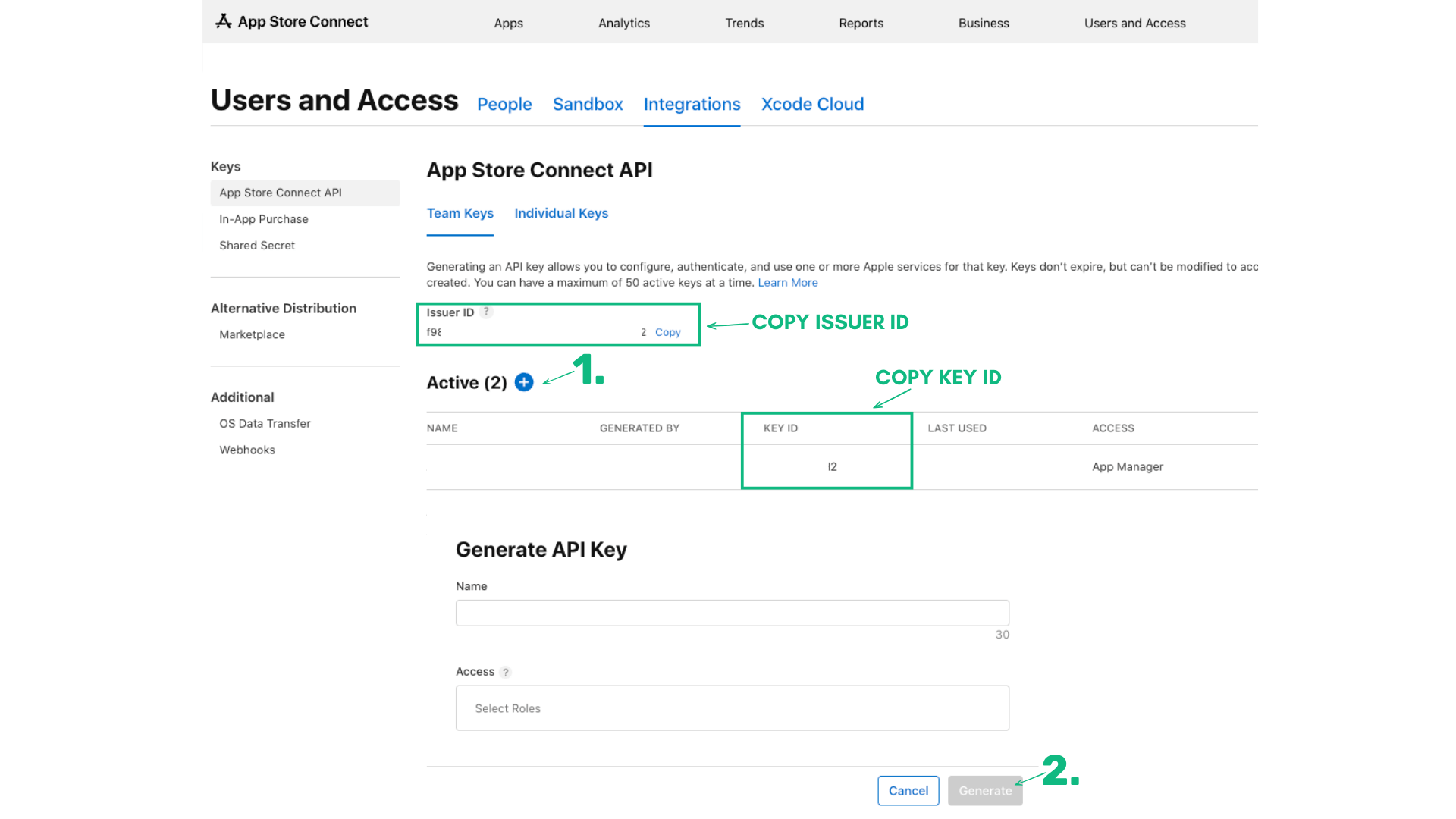
App Store Connect > Users and Access > Integrations > API Keys
What AppMetaHub accesses with your key
Revoking access
To disconnect AppMetaHub, go to App Store Connect > Users and Access > Integrations > API Keys and revoke the key. AppMetaHub will immediately lose all access.
Editing Metadata
The metadata editor is where you'll spend most of your time. It lets you edit all localizable fields for any locale, with real-time character counts and validation.
Editable fields
| Field | Max Length | Notes |
|---|---|---|
| App Name | 30 chars | The name shown on the App Store. Heavily weighted for search. |
| Subtitle | 30 chars | Appears below the app name. Use for keywords and value prop. |
| Keywords | 100 chars | Comma-separated. Not visible to users. Critical for discoverability. |
| Description | 4,000 chars | Full app description. Not indexed for search but important for conversion. |
| Promotional Text | 170 chars | Appears above the description. Can be updated without a new app version. |
| What's New | 4,000 chars | Release notes for the current version. |
| Support URL | URL | Link to your support page. |
| Marketing URL | URL | Link to your marketing website. |
Metadata editor — editing App Name and Subtitle with character counts
Working with locales
AppMetaHub supports all 37 App Store locales. Switch between locales instantly using the dropdown — no page reloads, no tab switching.
AI metadata suggestions
Click the AI button to generate optimized titles, subtitles, keywords, and descriptions based on your app's category, current metadata, and competitor landscape.
Available on Indie and Pro plans. You can also generate metadata via the MCP server from Claude Code, Cursor, or any MCP-compatible editor.
Snapshot history & word-level diffs
Every time you save or push, AppMetaHub creates a snapshot. Compare any two snapshots to see a word-level diff of every field across every locale. Changed your mind? Revert any field to a previous version with one click.
Available on Indie and Pro plans.
Screenshots
Manage your App Store screenshots for all device types and locales from one place. Upload, reorder, and organize screenshots visually.
Supported device types
- iPhone 6.9" (required for 6.7" and 6.5" displays)
- iPhone 6.5" (Pro Max)
- iPhone 5.5" (iPhone 8 Plus and earlier)
- iPad Pro 13" (6th gen)
- iPad Pro 12.9" (2nd gen)
Screenshot limits
- Maximum: 10 screenshots per device type, per locale
- Minimum: Apple requires at least 1 screenshot to submit for review
- Format: PNG or JPEG, RGB color space, no alpha/transparency
Screenshot storyboards
Storyboards let you visually plan and organize your screenshot flow. Drag and drop to reorder, and see your entire listing layout at a glance. Storyboards can be localized — set up the layout once and apply it across all locales.
Available on Indie and Pro plans.
Screenshot storyboard view — drag and drop to reorder
In-App Purchases & Subscriptions
AppMetaHub can sync and display your in-app purchases and subscriptions from App Store Connect. You can view and manage localized display names, descriptions, and pricing for all your IAPs.
What you can do in AppMetaHub
View all subscription groups and subscriptions
See your entire subscription catalog in one place.
Edit localized display names and descriptions
Update subscription names and descriptions across all locales.
View pricing and territories
See which prices are active in which territories.
Manage in-app purchase localizations
Localize consumable and non-consumable IAP metadata.
What you need to do in App Store Connect
Create new in-app purchases
New IAPs must be created in ASC. Go to Your App > Monetization > In-App Purchases.
Create subscription groups
Subscription groups must be set up in ASC first. Go to Your App > Monetization > Subscriptions.
Set pricing and availability
Price points and territory availability are managed in ASC.
Submit for review
New IAPs need to be submitted with an app update for Apple review.
In-App Purchases view — subscription groups and their localizations
Reviews & Ratings
Track customer reviews and ratings across all App Store territories. Filter by rating, territory, date, and read/unread status.
Reviews
- Fetch and filter: View all reviews sorted by date, filter by star rating or territory
- Mark as seen: Track which reviews you've read
- Respond: Reply to reviews directly from the AppMetaHub dashboard
- AI analysis: Get sentiment analysis and common themes from your reviews
Ratings
AppMetaHub fetches ratings from all 37+ App Store territories. See your average rating per country, track changes over time, and identify regions where your app performs well or needs attention.
Available on Indie and Pro plans.
Finally an app that tracks everything I need. The workout plans are amazing.
Love the concept but calorie tracking could be more accurate. Crashes sometimes on older phones.
App crashes every time I try to sign in. Please fix!
Reviews dashboard — filter by rating, respond to reviews
Push to App Store
The signature feature. Push all your metadata changes to App Store Connect with one click — all locales at once.
How it works
Make your edits
Edit metadata for any locale in the metadata editor.
Click "Push to App Store"
AppMetaHub shows you a diff of every change that will be made — field by field, locale by locale.
Review the diff
Green = additions, red = removals. Make sure everything looks correct.
Confirm
Click confirm and AppMetaHub pushes all changes to ASC via the official API. You get a success/error report for each locale.
You can restore any previous version at any time from the History panel
Push preview — diff showing what will change in ASC
MCP Server Setup
The AppMetaHub MCP (Model Context Protocol) server lets you manage your App Store metadata directly from AI coding tools like Claude Code, Cursor, or Windsurf. Read metadata, edit keywords, generate AI suggestions, and push to App Store Connect — all without leaving your IDE.
Prerequisites
AppMetaHub API key
Generate one in Settings > API Keys in your AppMetaHub dashboard.
That's it — one API key and you're up and running in under 2 minutes. AI features are built in, no separate keys needed.
Step 1: Generate your API key
Go to your AppMetaHub dashboard > Settings > API Keys > Create New Key. Choose the scopes you need:
| Scope | What it allows |
|---|---|
| read | List apps, get metadata, keywords, reviews, competitors |
| write | Update metadata, add/remove keywords, add competitors |
| push | Push changes to App Store Connect |
| * | Full access (all operations) |
aso_7k3m8b...Created 3 days ago · Last used 2 hours ago
MCP Configuration
Add to your MCP client:
{
  "mcpServers": {
    "appmetahub-aso": {
      "command": "node",
      "args": ["dist/index.js"],
      "env": {
        "ASO_API_KEY": "aso_7k3m8b..."
      }
    }
  }
}
Settings > API Keys — generating a new MCP server key
Step 2: Install the MCP server
cd /path/to/appmetahub
cd mcp-server-aso
npm install
npm run build
Step 3: Configure your AI assistant
Claude Code
Add to your project's .mcp.json file (or ~/.claude/.mcp.json for global access):
{
  "mcpServers": {
    "appmetahub-aso": {
      "command": "node",
      "args": ["/path/to/mcp-server-aso/dist/index.js"],
      "env": {
        "ASO_API_KEY": "aso_your_key_here",
        "API_BASE_URL": "http://localhost:3000"
      }
    }
  }
}
API_BASE_URL defaults to http://localhost:3000 if omitted.
Cursor
Go to Cursor Settings > Features > MCP Servers > Add New MCP Server, or add to .cursor/mcp.json in your project:
{
  "mcpServers": {
    "appmetahub-aso": {
      "command": "node",
      "args": ["/path/to/mcp-server-aso/dist/index.js"],
      "env": {
        "ASO_API_KEY": "aso_your_key_here",
        "API_BASE_URL": "http://localhost:3000"
      }
    }
  }
}
Windsurf / Other MCP Clients
Most MCP-compatible tools use the same configuration format. Add the server using the command and args pattern shown above. Check your tool's docs for the exact config file location.
Available tools (30 total)
Read Operations
list-appsList all your appsget-appGet detailed info about a specific appget-metadataGet metadata for a localeget-keywordsGet tracked keywordsget-localesList available localesget-competitorsGet tracked competitorsget-reviewsFetch customer reviewsWrite Operations
update-metadataUpdate metadata fieldsadd-keywordAdd keyword to trackingadd-keywords-batchAdd multiple keywordsdelete-keywordRemove keywordadd-competitorAdd competitor to trackLocale Management
create-localeCreate a new locale for an appsync-localesSync locales from App Store ConnectMonetization
list-subscriptionsList all subscriptions for an applist-iapsList all in-app purchasessync-subscriptionsSync subscriptions from App Store Connectsync-iapsSync in-app purchases from App Store Connectupdate-subscription-localizationUpdate subscription display name and descriptionupdate-iap-localizationUpdate in-app purchase display name and descriptionupdate-subscriptionUpdate subscription detailsupdate-iapUpdate in-app purchase detailspush-subscription-localizationPush subscription localization to App Store Connectpush-iap-localizationPush IAP localization to App Store ConnectScreenshots
upload-screenshotsUpload screenshots to App Store ConnectAI Operations
generate-metadataAI-generate optimized metadatasuggest-keywordsAI keyword suggestionsAnalysis & Push
check-ranksTrigger keyword rank checkcompare-competitorsCompare with competitorspush-to-appstorePush metadata to App Store ConnectExample conversations
You: List my apps
AI: [uses list-apps] You have 3 apps: FitTrack Pro, Sudoku Grid, PhotoVault
You: Generate new metadata for FitTrack Pro
AI: [uses generate-metadata] Here are 3 title options...
You: Apply option 1 and push to App Store
AI: [uses update-metadata, then push-to-appstore] Done! Changes pushed to ASC.
You: Suggest keywords for my Sudoku app
AI: [uses suggest-keywords] Here are 20 keyword suggestions...
You: Add the top 10 to tracking
AI: [uses add-keywords-batch] Added 10 keywords.
You: Check their rankings
AI: [uses check-ranks] Rankings updated. 'sudoku free' is #12...
Plans & Limits
AppMetaHub has three plans designed for different needs. Here are the important limits to know:
| Limit | Free | Indie ($15/mo) | Pro ($35/mo) |
|---|---|---|---|
| Connected apps | 1 | 5 | Unlimited |
| Locales | 5 | 37 | 37 |
| Metadata editing | Yes | Yes | Yes |
| Push to ASC | Yes | Yes | Yes |
| Screenshot storyboards | No | Yes | Yes |
| Snapshot history & diffs | No | Yes | Yes |
| AI metadata suggestions | No | Yes | Yes |
| Reviews & ratings | No | Yes | Yes |
| MCP server | Read-only | Full | Full |
| Team seats | 1 | 1 | 5 |
| Support | Community | Priority |
See full feature comparison and pricing on the Plans & Pricing page.
Apple-enforced character limits
These limits are set by Apple and apply to all apps, regardless of your AppMetaHub plan:
App Name
30 chars
Subtitle
30 chars
Keywords
100 chars
Description
4,000 chars
Promo Text
170 chars
What's New
4,000 chars
Content restrictions
★ ☆ ● ○ ◆ ◇ ▲ △ ■ □ ✦ ✧. Apple rejects metadata containing these characters.Troubleshooting
App sync shows "No apps found"
Possible causes
- •Your API key doesn't have the App Manager role
- •Your API key is expired or revoked
- •You haven't created any apps in App Store Connect yet
- •Your Apple Developer membership has lapsed
Solutions
- Verify the API key role in App Store Connect > Users and Access > Integrations
- Generate a new API key with the App Manager role
- Create at least one app in App Store Connect first, then sync again
Push to ASC fails
Possible causes
- •Your app version is in a state that doesn't allow edits (e.g., in review, ready for distribution)
- •Your API key doesn't have write permissions
- •Apple's API is temporarily down
- •Metadata contains disallowed characters
Solutions
- Check your app version state in ASC — you can only edit metadata on editable versions (Prepare for Submission)
- If your version is already submitted, you may need to create a new version first in ASC
- Verify your API key has the App Manager role
- Try again in a few minutes if Apple's API is down
Metadata doesn't update after push
Possible causes
- •The push succeeded but App Store Connect caches data
- •You're looking at a different version or locale
- •The field is "Promotional Text" which updates immediately, but ASC may cache the display
Solutions
- Refresh App Store Connect (hard refresh: Cmd+Shift+R)
- Check the correct version and locale in ASC
- Click "Sync" in AppMetaHub to pull the latest data from ASC
Screenshots don't upload
Possible causes
- •Image format not supported (must be PNG or JPEG, RGB, no alpha)
- •Image dimensions don't match the device type requirements
- •File size exceeds Apple's limits
- •10 screenshots already exist for that device/locale
Solutions
- Ensure screenshots are PNG or JPEG in RGB color space without transparency
- Check Apple's required dimensions for each device type
- Remove existing screenshots before uploading new ones if at the 10 limit
MCP server won't start
Possible causes
- •Missing environment variables
- •Build step was skipped
- •Invalid API key
Solutions
- Ensure ASO_API_KEY is set (and optionally API_BASE_URL if not using localhost:3000)
- Run `npm run build` in the mcp-server-aso directory
- Verify your API key in AppMetaHub dashboard > Settings > API Keys
MCP server: 'Invalid API key' error
Possible causes
- •API key is incorrect or has a typo
- •API key was revoked or expired
- •The key was copied with extra whitespace
Solutions
- Copy the full API key from AppMetaHub > Settings > API Keys
- Generate a new key if the old one was revoked
- Make sure there are no leading/trailing spaces in the ASO_API_KEY value
Reviews or ratings not loading
Possible causes
- •You're on the Free plan (reviews/ratings require Indie or Pro)
- •The app has no reviews yet
- •Apple's iTunes API is slow to update
Solutions
- Upgrade to Indie or Pro to access reviews and ratings
- Wait for your first reviews to appear (can take 24-48 hours after an app goes live)
- Try syncing again — ratings data comes from the iTunes API which updates periodically
Can't edit metadata — fields are disabled
Possible causes
- •You've reached your locale limit on the Free plan
- •The app version is not in an editable state
- •Your subscription has expired
Solutions
- Check your plan limits in Settings > Billing
- Verify the app version state in App Store Connect (must be 'Prepare for Submission')
- Renew your subscription or switch to the Free plan
Frequently Asked Questions
Do I need to have my app already in the App Store?
Your app needs to exist in App Store Connect, but it doesn't need to be published yet. As long as you've created the app record and set up at least one version (even in 'Prepare for Submission' state), AppMetaHub can sync it.
Can AppMetaHub create a new app in App Store Connect?
No. AppMetaHub manages existing apps. To create a new app, go to App Store Connect > My Apps > click '+'. Once the app is created, sync it in AppMetaHub.
Is it safe to give AppMetaHub my API key?
Yes. We use Apple's official App Store Connect API — no passwords or session cookies. Your API key is encrypted with AES-256-GCM at rest. AppMetaHub never modifies anything without your explicit confirmation. You can revoke access anytime from Apple's side.
Can I use AppMetaHub and App Store Connect at the same time?
Yes. AppMetaHub syncs both ways. Edit in ASC, then click "Sync" in AppMetaHub to pull changes. Or edit in AppMetaHub and push to ASC. The two work together.
What happens if I downgrade from Indie to Free?
You keep access to all your data, but your active features are limited to the Free plan (1 app, 5 locales, no storyboards/history). Your other apps and locales remain saved — they become accessible again if you upgrade.
Can I create in-app purchases or subscriptions in AppMetaHub?
Not yet. AppMetaHub reads and syncs your existing IAPs from App Store Connect. You can view and edit localized names/descriptions, but creating new IAPs must be done in ASC.
Does AppMetaHub work for Android / Google Play?
Currently, AppMetaHub is iOS / App Store Connect only. Google Play support may come in the future.
What's the MCP server? Do I need it?
The MCP server is an optional feature that lets you access your AppMetaHub data from AI coding assistants like Claude Code or Cursor. If you don't use AI assistants, you don't need it. If you do, it's a powerful way to manage ASO without leaving your editor.
How do I cancel my subscription?
Go to Settings > Billing > Manage Subscription. You'll be taken to the Stripe customer portal where you can cancel anytime. You keep paid features until the end of your billing cycle.
I found a bug. How do I report it?
Email us at support@appmetahub.com or reach out through the in-app support. We take bugs seriously and typically respond within 24 hours.